A Multiplier controls how strongly time changes Spark.
At x1.0, 30 minutes changes Spark by 30. At x1.5, the same 30 minutes changes Spark by 45. Growth activities add Spark, while Leisure activities spend Spark.
 HabitSpark Download on the App Store App Store
 Multipliers
Not every activity should count the same. HabitSpark Multipliers let a minute of Deep Work, Reading, Gaming, or Rest change your Spark balance at the rate that fits the activity.
Install HabitSpark, create two activities, and leave Multipliers at x1.0 until you have a real reason to adjust them.
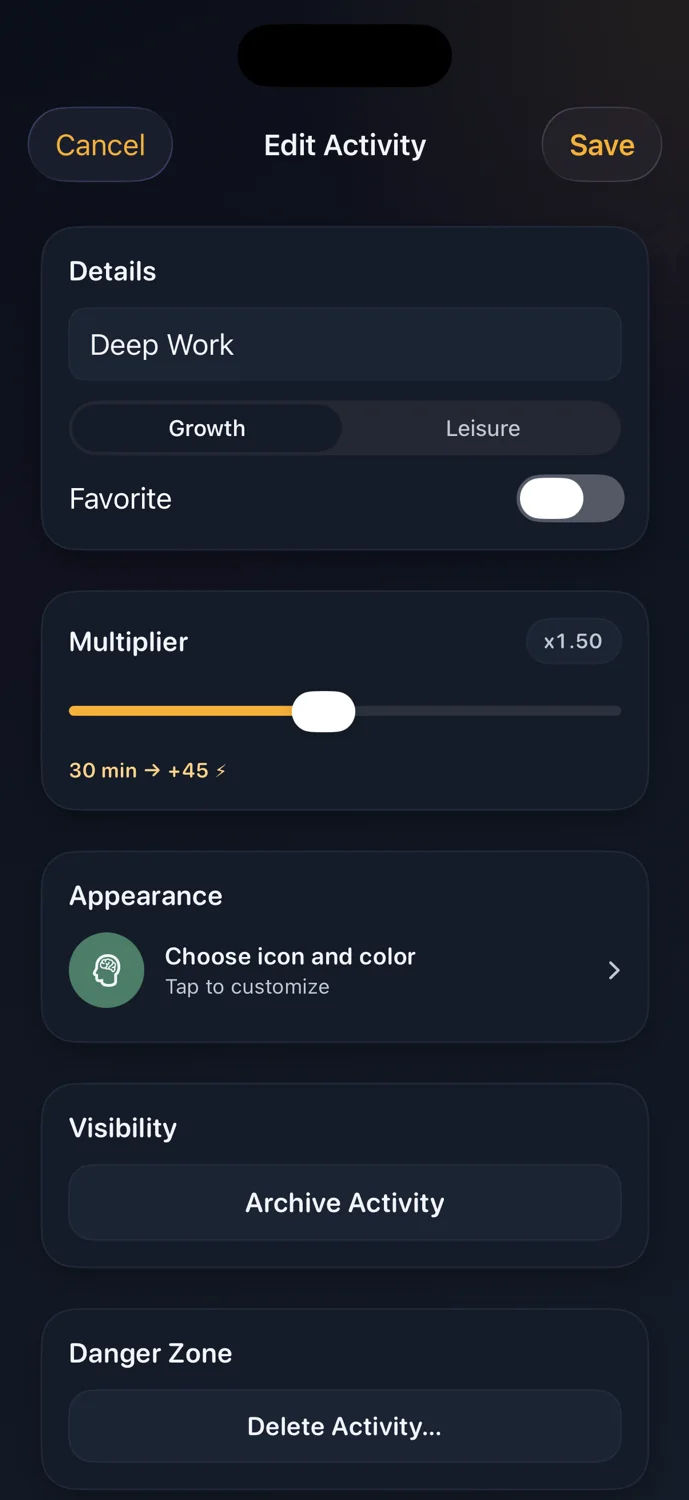
At x1.0, 30 minutes changes Spark by 30. At x1.5, the same 30 minutes changes Spark by 45. Growth activities add Spark, while Leisure activities spend Spark.
Use Multipliers to reflect how an activity feels in your life. Deep Work might deserve a stronger Growth rate, while a quick Rest break might stay lower than an easy-to-overdo Leisure activity.
Activity weighting
Not every Growth activity feels equally demanding, and not every Leisure activity feels equally restorative. Multipliers let you tune how strongly each activity changes Spark.
Practical examples
You might keep Reading at x1.0, make Deep Work higher, and give a relaxing break a lower Leisure Multiplier than an activity that tends to consume more of the day.
Product detail
When you track time, the session uses the activity's Multiplier at that moment. That keeps History understandable even if you adjust the activity later.
Good fit
If 30 minutes of Deep Work should carry more weight than 30 minutes of light admin, or if one Leisure activity tends to pull harder than another, a Multiplier gives you a simple way to reflect that.
Example setup
You might keep Reading at x1.0, set Study at x1.5, set Deep Work at x2.0, keep Rest at x1.0, and set Gaming at x1.5 if it tends to use more of the evening. These are starting points, not rules.
What HabitSpark does
HabitSpark lets each activity use its own Multiplier from x0.25 to x3.0 in x0.25 steps, with x1.0 as the default.What HabitSpark does not do
HabitSpark does not require Pro for Multipliers, force every activity to be equal, or turn Multipliers into punishment.How it works
Add a Growth or Leisure activity that you actually use, such as Reading, Deep Work, Rest, Gaming, or Socials.
Start at x1.0, then adjust only when an activity should affect Spark more softly or more strongly.
Track a few sessions and check History before changing too many rates at once.
FAQ
A Multiplier controls how strongly an activity changes Spark. Higher Multipliers make that activity earn or spend Spark faster.
Not necessarily. You can keep simple activities at x1.0 and adjust activities that feel more intense, valuable, or costly.
HabitSpark supports Multipliers from x0.25 to x3.0 in x0.25 steps, with x1.0 as the default.
No. Multipliers are part of HabitSpark's free core activity model.
HabitSpark
HabitSpark Multipliers help the same time-balance model work for different kinds of effort and leisure.