HabitSpark gives Shortcuts actions, not app monitoring.
The automation trigger lives in Apple's Shortcuts app. HabitSpark exposes actions that Shortcuts can run when you configure a trigger such as opening or closing another app.
 HabitSpark Download on the App Store App Store
 Apple Shortcuts
HabitSpark provides Shortcuts actions for starting an activity timer and stopping the current timer. You choose when Apple Shortcuts runs them.
Install HabitSpark, create the activity you want to automate, then build the automation in Apple's Shortcuts app.
The automation trigger lives in Apple's Shortcuts app. HabitSpark exposes actions that Shortcuts can run when you configure a trigger such as opening or closing another app.
Opening Kindle can start Reading. Opening Notion can start Deep Work. Closing that app can run Stop HabitSpark Timer so the session ends without extra taps.
Automation
You can create shortcuts that start a HabitSpark activity or stop the current timer. Apple Shortcuts decides when those actions run.
Examples
For example, opening Kindle can run a Start Reading shortcut, and closing Kindle can run Stop HabitSpark Timer. The same pattern can work for Notion and Deep Work.
Setup shape
A reliable setup usually has two parts: a saved shortcut that starts a chosen HabitSpark activity, and a Personal Automation that runs that shortcut when another app opens.
Troubleshooting
If a timer is already active, starting another activity from Shortcuts will not replace it. Stop the current timer first or use a matching App Closed automation.
Example automation
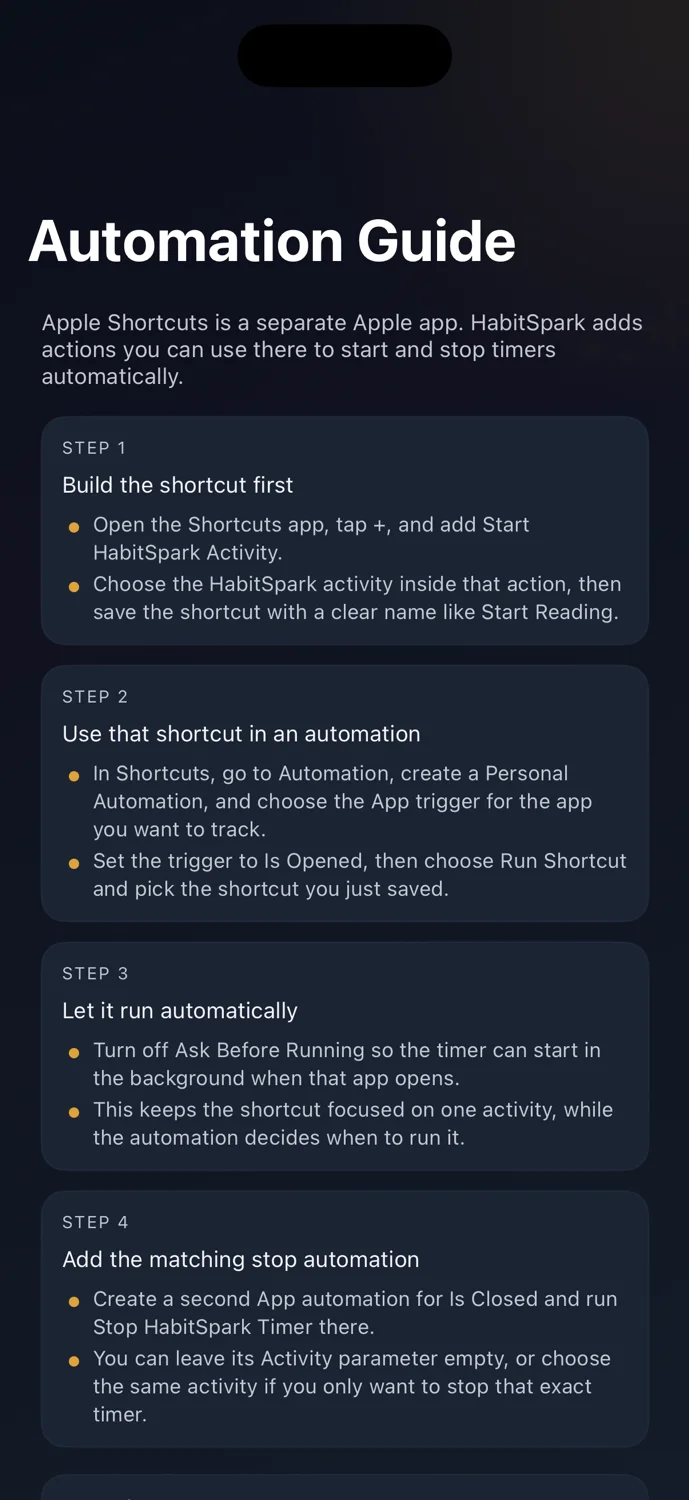
Create a shortcut that runs Start HabitSpark Activity with Reading selected. Then create a Personal Automation in Apple Shortcuts for when Kindle opens, and have it run that saved shortcut. Add a matching App Closed automation that runs Stop HabitSpark Timer.
What HabitSpark does
HabitSpark provides Start HabitSpark Activity and Stop HabitSpark Timer actions that Apple Shortcuts can run from automations you create.What HabitSpark does not do
HabitSpark does not import Apple Screen Time, monitor app usage by itself, block apps, or create Shortcuts automations for you.How it works
In Apple Shortcuts, make a shortcut that uses Start HabitSpark Activity and choose the activity you want to start.
Create a Personal Automation for when a chosen app opens, run your saved shortcut, and turn off Ask Before Running when iOS offers that option.
Create a matching App Closed automation that runs Stop HabitSpark Timer. You can optionally choose an activity so it only stops the expected timer.
FAQ
HabitSpark provides Shortcuts actions. Apple Shortcuts can run them automatically if you create automations such as App Open or App Closed triggers.
No. HabitSpark does not monitor app usage itself. Automations only run when you configure them in Apple's Shortcuts app.
HabitSpark only supports one active timer. If a timer is already active, a Start HabitSpark Activity shortcut will not replace it.
Yes. Stop HabitSpark Timer can optionally include an activity, so it only stops when the currently active timer matches that activity.
HabitSpark
HabitSpark Shortcuts are useful when you want a routine to start from another app while keeping tracking private and intentional.